7 Requirements Analysis and Design Definition
Gathering requirements is only the beginning. Raw information from stakeholders must be analyzed, organized, and expressed in forms that enable solution development. This chapter covers the critical work of transforming what you hear into models and specifications that teams can act upon.
Requirements Analysis and Design Definition encompasses many activities: describing requirements using analytical techniques, ensuring quality and consistency, confirming that requirements deliver business value, structuring requirements cohesively, identifying potential solutions, and recommending the option that provides greatest value.
7.1 Specifying and Modeling Requirements
Specifying and modeling involves analyzing information from stakeholders and creating views that can be understood from all perspectives. When the focus is understanding needs, the outputs are requirements. When the focus is specifying solutions, the outputs are designs.
7.1.1 Three Ways to Express Requirements
Requirements can be expressed as text, matrices, or models.
Text uses written language to describe capabilities, conditions, and constraints. Textual requirements are accessible to most audiences but can be ambiguous and difficult to verify for completeness.
Matrices organize information in tables that show relationships, status, or attributes. A requirements traceability matrix shows how requirements connect to business goals, design elements, and test cases.
Models are simplified representations of complex reality that help understanding and decision-making. Models may be textual or graphical. Graphical models use visual elements to show structures and relationships.
7.2 Unified Modeling Language
UML provides standardized notations for modeling software systems. It represents both structure and behavior using diagrams that anyone trained in UML can read.
Structural diagrams show how systems are organized. Behavioral diagrams show how systems act and interact.
Key diagram types include activity diagrams showing workflows, use case diagrams showing system functionality from user perspectives, sequence diagrams showing message exchanges between components, and class diagrams showing structures and relationships.
7.3 User Stories
User stories provide a simple, powerful format for capturing requirements from the user’s perspective.
A user story follows a template:
As a [type of user], I want [some goal] so that [some reason].
This format ensures that every requirement identifies who needs something, what they need, and why they need it. The “why” is particularly valuable because it enables solution teams to understand intent, not just specification.
Consider this example: “As a jobseeker, I want to post my resume on the job portal so employers can find me.”
The user is a jobseeker. The goal is posting a resume. The reason is being found by employers. A development team reading this understands not just what to build but why it matters.
7.4 Acceptance Criteria
Acceptance criteria define boundaries for user stories and confirm when stories are complete and working as intended.
While user stories describe what users want, acceptance criteria describe how we know they got it. They specify conditions that must be met for the requirement to be considered satisfied.
For the jobseeker story, acceptance criteria might include:
- The system must allow upload of documents in PDF and Word formats
- Uploaded resumes must be searchable by employers within 24 hours
- Users must be able to update or delete their resumes at any time
Acceptance criteria transform vague expectations into testable conditions.
7.5 Use Cases
Use cases define goal-oriented interactions between external actors and the system. They describe how users accomplish specific goals through system interactions.
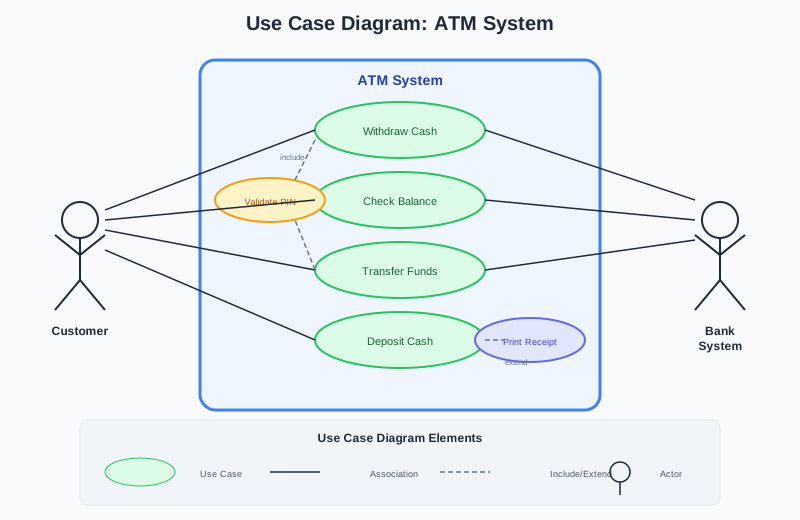
Use cases serve many purposes (Figure 7.1). They provide a high-level view of the system. They document user requirements in user-centric terms. They explore alternative scenarios. They inform user interface design. They form a basis for testing.
7.5.1 Use Case Diagram Elements
Actors are people, organizations, or systems that interact with the system. They appear as stick figures.
Use cases are specific functions or goals, shown as ovals.
The system boundary is a rectangle showing what is inside versus outside the system.
Associations are lines connecting actors to use cases.
7.5.2 Use Case Relationships
Include relationships indicate that one use case always incorporates another.
Extend relationships indicate that one use case may optionally extend another under certain conditions.
7.5.3 Use Case Narratives
Narratives document use case name, description, actors, preconditions, postconditions, basic flow, alternative flows, exception flows, and business rules.
Basic Flow Example: Withdraw Cash from ATM
- Customer inserts ATM card
- System requests PIN
- Customer enters PIN
- System verifies PIN
- System displays service options
- Customer selects withdrawal
- System asks for account type
- Customer selects account
- System asks for amount
- Customer enters amount
- System processes request
- System dispenses cash
- Customer takes cash
- Transaction ends
7.6 Business Process Modeling
A business process is a set of logically related tasks performed to achieve a defined business outcome.
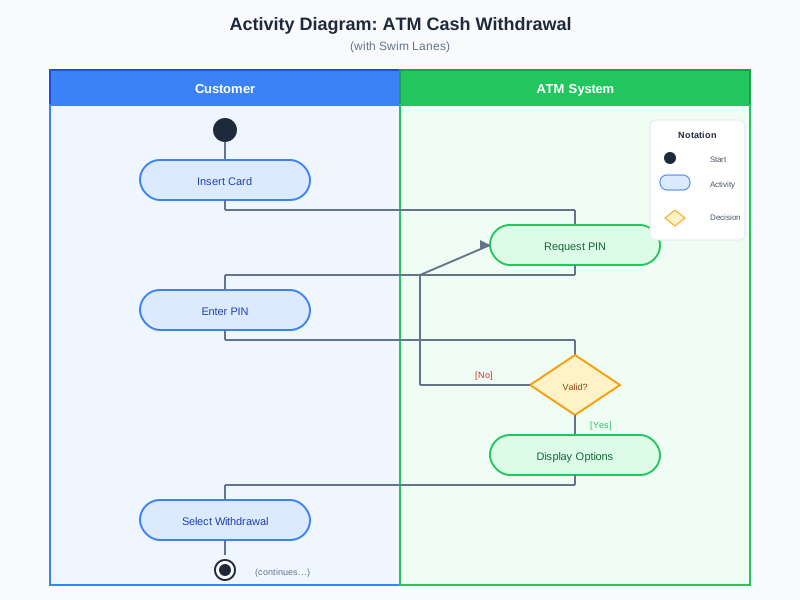
Activity diagrams (Figure 7.2) provide pictures of end-to-end business processes.
7.6.1 Activity Diagram Components
Initial nodes (filled circles) show where processes start.
Final nodes (filled circles with rings) show where processes end.
Activity nodes (rounded rectangles) show tasks.
Decision nodes (diamonds) show where flow branches.
Fork and join bars show parallel activities.
Swimlanes divide the diagram into sections representing different actors.
7.7 Class Diagrams
Class diagrams show system structure by depicting classes, attributes, operations, and relationships.
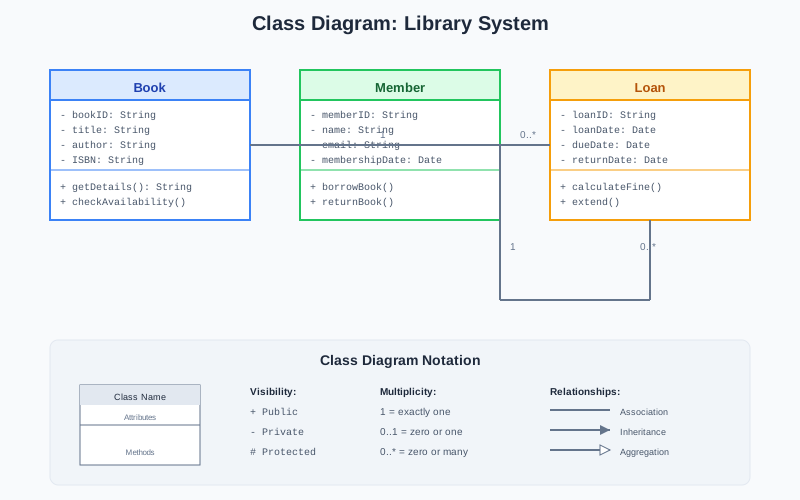
Class diagrams (Figure 7.3) model business terminology, show collaborations needed to implement use cases, and provide the basis for implementation.
7.7.1 Class Notation
A class appears as a rectangle with compartments for name, attributes, and operations.
7.7.2 Relationships
Association represents relationships between classes (solid line).
Aggregation represents “whole-part” relationships where parts can exist independently (open diamond).
Composition represents “whole-part” relationships where parts cannot exist without the whole (filled diamond).
Generalization shows inheritance (hollow triangle).
7.7.3 Multiplicity
- 1 means exactly one
- 0..1 means zero or one
- ***** means zero or more
- 1..* means one or more
7.8 Verifying Requirements
Verification confirms that requirements meet quality criteria: atomic, complete, consistent, concise, feasible, unambiguous, testable, prioritized, and understandable.
7.9 Validating Requirements
Validation ensures requirements align with business needs and deliver expected value.
7.10 Case Example: The Online Course Registration System
State College needed to modernize its course registration system. The existing system required in-person registration. Lines stretched across campus. Classes filled within minutes.
The Business Analyst used multiple techniques:
- User stories captured student needs
- Use case diagrams mapped major functionality
- Use case narratives detailed interactions
- Activity diagrams modeled the registration process
- Class diagrams captured key entities
The models revealed gaps that interviews had not surfaced. What happens with conflicting class times? How does the system handle corequisites? What if a student is on multiple waitlists?
Working through these questions produced requirements that were complete, consistent, and testable. The new system launched successfully. Registration that once took days now completes in minutes.
Now that you understand how to analyze requirements and design solutions, let us explore how these practices adapt to Agile environments.
7.11 Review Questions
What is the purpose of acceptance criteria for user stories?
- To replace detailed requirements documentation
- To define testable conditions that confirm when a story is complete
- To identify which developer will implement the story
- To estimate how long implementation will take
In a use case diagram, what does an “include” relationship indicate?
- The included use case is optional
- The included use case always executes when the including use case executes
- The included use case replaces the including use case
- The two use cases are identical
Which UML diagram type shows the flow of activities in a business process?
- Class diagram
- Use case diagram
- Activity diagram
- Sequence diagram
In class diagram notation, what does a filled diamond represent?
- Association
- Aggregation
- Composition
- Generalization
The difference between verification and validation is:
- There is no meaningful difference
- Verification checks quality criteria; validation checks alignment with business needs
- Verification is done by testers; validation is done by analysts
- Verification is optional; validation is required
1-b, 2-b, 3-c, 4-c, 5-b